ERP software pricing can vary considerably depending on the size of the business, the number of users, required modules, deployment method, integrations, and customization needs. The initial software price is only one part of the overall investment.
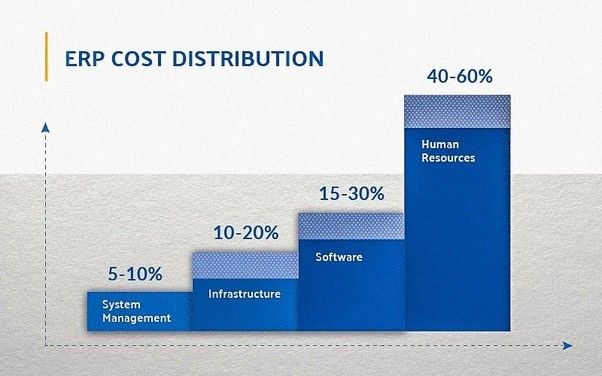
A realistic ERP budget should account for implementation, data migration, infrastructure, employee training, maintenance, technical support, and future system changes. Evaluating these factors early can help businesses compare ERP options more accurately and avoid unexpected expenses during implementation.
This ERP software cost guide explains the primary pricing models and cost factors businesses should consider before selecting or developing an ERP system.
What Determines the Cost of ERP Software?
ERP software is rarely priced as a single, fixed product. Its cost depends on how the system will support the organization’s processes, departments, users, and technical requirements.
Important factors include:
- Number of users and business locations
- Required ERP modules
- Cloud or on-premises deployment
- Customization requirements
- Third-party software integrations
- Volume and condition of existing data
- Implementation and training requirements
- Ongoing support and maintenance
Before investing in ERP software, businesses should document their operational requirements and identify which functions must be available at launch. This helps prevent unnecessary modules, excessive customization, and inaccurate cost estimates.
Common ERP Pricing Models
ERP vendors and development companies generally offer several pricing approaches. The appropriate model depends on the organization’s technical resources, budget, deployment preferences, and long-term plans.
Subscription-Based ERP Pricing
Cloud ERP and software-as-a-service platforms commonly use monthly or annual subscription pricing. Fees may be based on the number of users, selected modules, transaction volume, storage, or service level.
Subscription plans may reduce the initial infrastructure investment because hosting, updates, and some maintenance services are usually managed by the provider. However, businesses should calculate the cumulative subscription cost over several years rather than comparing only the monthly price.
Perpetual Licensing
A perpetual license generally allows a business to use a specific version of the ERP system after paying an upfront license fee. Additional charges may apply for implementation, infrastructure, maintenance, upgrades, and technical support.
This model may suit organizations that want greater control over deployment and have the internal resources to manage the system. However, the initial investment is often higher than a subscription-based option.
Open-Source ERP
Open-source ERP software does not usually require a traditional proprietary licensing fee. However, open source does not mean the system has no cost.
Businesses may still need to budget for:
- Requirement analysis
- System configuration
- Custom development
- Hosting and infrastructure
- Data migration
- Third-party integrations
- Security testing
- Training and technical support
An open-source ERP framework can provide greater control over the source code and system architecture. It may be suitable for organizations with specialized workflows that cannot be handled effectively by a standard ERP product.
Key Factors That Affect ERP Software Cost
1. Business Size and Number of Users
The number of employees, departments, branches, warehouses, and legal entities using the ERP system can affect both licensing and implementation costs.
A system serving one department at a single location will generally require less configuration than an ERP platform supporting multiple companies, currencies, tax structures, and regional operations.
2. ERP Modules and Features
ERP systems are commonly divided into modules that manage specific business functions. Each additional module may increase licensing, configuration, testing, training, and maintenance requirements.
Common ERP modules include:
- Accounting and financial management
- Customer relationship management
- Inventory and warehouse management
- Supply chain management
- Procurement and vendor management
- Human resources and payroll
- Manufacturing and production planning
- Business intelligence and reporting
Businesses should prioritize modules based on operational requirements instead of implementing every available feature at once. A phased implementation can make the project easier to manage and reduce unnecessary initial costs.
3. ERP Customization
Customization may be required when standard ERP workflows do not reflect the organization’s actual processes. It can include custom approval rules, reports, dashboards, user interfaces, automation, or industry-specific functionality.
Customization increases development and testing requirements. It may also affect future upgrades because custom code must be reviewed whenever the underlying ERP platform changes.
Before approving custom development, businesses should determine whether the requirement can be handled through standard configuration. Configuration is usually easier to maintain than modifying the core application.
4. Third-Party Integrations
ERP systems often need to exchange information with ecommerce platforms, banking systems, payment gateways, logistics providers, customer portals, payroll applications, CRM platforms, and reporting tools.
Integration costs depend on:
- Availability and quality of APIs
- Volume and frequency of data transfers
- Real-time or scheduled synchronization requirements
- Data mapping complexity
- Error handling and monitoring requirements
- Security and authentication standards
Integration requirements should be identified during the ERP discovery phase. Treating integrations as an afterthought can lead to implementation delays and additional development work.
5. Data Migration
Existing customer, supplier, employee, product, financial, and inventory data may need to be transferred into the new enterprise resource planning system.
Data migration may involve extracting information from legacy systems, removing duplicate records, correcting formatting issues, mapping fields, validating balances, and testing imported data.
The cost generally increases when information is spread across multiple systems or contains incomplete and inconsistent records. Cleaning the data before migration can reduce risk and improve the reliability of the new ERP system.
6. Hosting and IT Infrastructure
Cloud ERP platforms typically include hosting within the subscription fee, although additional charges may apply for storage, backups, environments, or usage levels.
On-premises or privately hosted ERP systems may require servers, databases, networking, monitoring, backup systems, security controls, and disaster recovery infrastructure. Businesses must also account for the employees or service providers responsible for maintaining that environment.
7. ERP Implementation
Implementation includes the work required to configure the ERP system and prepare it for operational use. Depending on the project, this may involve:
- Business process analysis
- System architecture planning
- Module configuration
- Workflow setup
- Custom development
- Integration development
- Data migration
- Security and permission configuration
- Testing and quality assurance
- Deployment and go-live support
The quality of implementation has a direct effect on ERP adoption and system reliability. Selecting software without adequately budgeting for implementation can result in a system that does not support the company’s actual workflows.
8. Employee Training and Change Management
Employees need practical training based on their roles and responsibilities. Finance teams, warehouse employees, managers, administrators, and sales staff may each require different training materials and sessions.
Change management is also important when the ERP system introduces new approval processes, responsibilities, or reporting requirements. Businesses should allocate time for user testing, documentation, feedback, and post-launch assistance.
9. Maintenance, Upgrades, and Support
ERP costs continue after the system goes live. Ongoing expenses may include:
- Technical support
- Security updates
- Software upgrades
- Bug fixes
- Performance monitoring
- Backup management
- Integration maintenance
- New reports and workflow changes
Support arrangements should clearly define response times, included services, escalation procedures, and responsibility for infrastructure and application issues.
Understanding the Total Cost of ERP Ownership
The total cost of ownership provides a more complete view of the ERP investment than the initial software or development price.
An ERP total cost of ownership estimate should include:
- Software licenses or subscription fees
- Implementation services
- Customization and development
- Third-party integrations
- Data migration
- Cloud hosting or on-premises infrastructure
- Employee training
- Change management
- Maintenance and technical support
- Future upgrades and enhancements
Businesses should estimate these expenses across several years. This provides a more reliable comparison between cloud, licensed, open-source, and custom ERP options.
How to Prepare an ERP Cost Estimate
- Document current processes: Identify how each department manages its daily tasks and where manual work or disconnected systems create problems.
- Define essential requirements: Separate required functionality from features that can be introduced later.
- Identify users and locations: Determine who will use the system and whether different branches, companies, or regions require separate configurations.
- Review integration and data needs: List the applications that must connect with the ERP and the data that must be migrated.
- Compare the total cost: Evaluate implementation, support, hosting, upgrades, and maintenance instead of comparing only license fees.
Conclusion
ERP software cost depends on much more than the price of a license or subscription. Modules, users, customization, integrations, data migration, hosting, implementation, training, and ongoing support all contribute to the total investment.
A detailed assessment can help businesses select an ERP approach that fits their operational requirements and technical capabilities. It also provides vendors and development teams with enough information to prepare a more accurate project estimate.
Need Help Estimating Your ERP Project?
NOI Technologies can assess your workflows, integration requirements, deployment preferences, and customization needs to help define a practical ERP implementation scope.