An enterprise resource planning application connects important business functions such as finance, inventory, procurement, sales, human resources, and reporting within one system. Instead of maintaining disconnected spreadsheets and software tools, businesses can use an ERP application to manage data and workflows from a central platform.
However, developing an ERP application involves more than combining several business modules. The system must reflect how the organization actually operates, support integrations with existing tools, protect sensitive information, and remain adaptable as business requirements change.
This guide explains the main ERP development approaches, deployment options, development stages, essential features, and planning considerations involved in building an ERP application.
What Is ERP Application Development?
ERP application development is the process of designing, building, integrating, and maintaining software that manages multiple business operations through a shared database and connected workflows.
An ERP application may be developed entirely from scratch, built using an open-source ERP framework, or created by configuring and extending an existing proprietary platform. The right approach depends on the complexity of the business, available budget, internal technical resources, integration requirements, and long-term ownership goals.
Unlike a standalone accounting or inventory application, ERP software must maintain consistent information across departments. For example, when a sales order is confirmed, the system may need to update inventory, generate fulfillment tasks, create an invoice, and record the financial transaction without requiring the same data to be entered several times.
Choosing an ERP Development Approach
Before selecting technologies or defining features, businesses need to decide how the ERP application will be built. Each approach offers a different balance of control, implementation effort, cost, and flexibility.
| Development Approach | Best Suited For | Main Considerations |
|---|---|---|
| Open-source ERP framework | Businesses that need customization and control over the source code | Requires technical expertise, implementation planning, and ongoing maintenance |
| Proprietary ERP platform | Organizations with relatively standard processes and vendor support requirements | May involve licensing costs, vendor limitations, and restricted customization |
| Fully custom ERP application | Businesses with specialized workflows that cannot be supported by standard products | Requires more development time, testing, documentation, and long-term product ownership |
Open-Source ERP Frameworks
Open-source frameworks provide access to the source code and allow development teams to modify workflows, data models, interfaces, and business rules. They can be a practical foundation when a company requires substantial customization but does not want to build every technical component from the beginning.
Open-source does not mean that the complete ERP implementation is free. Businesses still need to account for requirements analysis, development, cloud infrastructure, integrations, testing, security, training, and support.
The Moqui Framework, for example, can be used to develop enterprise applications with configurable business processes, service-oriented components, and integrated data management.
Proprietary ERP Platforms
Proprietary platforms are developed and licensed by software vendors. Products from companies such as SAP, Oracle, and Microsoft provide established modules, product documentation, implementation ecosystems, and vendor-managed updates.
This approach may support a faster implementation when business requirements closely match the platform’s standard features. However, licensing structures, customization restrictions, upgrade dependencies, and vendor lock-in should be reviewed before making a long-term decision.
Fully Custom ERP Development
A fully custom ERP application is designed around the organization’s specific processes. This approach gives businesses greater control over workflows, interfaces, integrations, permissions, and future development priorities.
Custom development is most appropriate when existing ERP platforms would require extensive workarounds or when the business relies on specialized operational processes. It also carries greater responsibility because the organization must plan for maintenance, security updates, documentation, testing, and product evolution.
Cloud, On-Premises, or Hybrid ERP Deployment
The deployment model determines where the ERP application and its data will be hosted.
Cloud ERP
A cloud ERP application is hosted on cloud infrastructure and accessed through a browser, mobile application, or connected device. Cloud deployment can make it easier to support distributed teams, remote access, infrastructure scaling, and centralized updates.
Cloud costs may include infrastructure usage, data storage, backups, monitoring, support, and software subscriptions. The final cost depends on whether the application is provided as software as a service or operated as a custom system within the company’s own cloud environment.
On-Premises ERP
An on-premises ERP application is hosted on infrastructure managed by the organization. This model provides direct control over servers, networks, security configurations, and data storage.
It may be appropriate for organizations with strict infrastructure policies, internal data center capabilities, or specialized regulatory requirements. It also requires internal resources for hardware maintenance, backups, disaster recovery, monitoring, and software updates.
Hybrid ERP
A hybrid model combines cloud-based and on-premises components. For example, a business may host its core financial system internally while using cloud applications for customer portals, analytics, or mobile warehouse operations.
The decision should be based on security requirements, application performance, integration complexity, infrastructure capabilities, and total cost of ownership. A more detailed comparison is available in this guide to cloud ERP and on-premises ERP.
ERP Application Development Process
1. Analyze Business Requirements
ERP development should begin with an analysis of existing workflows rather than a list of requested software features. The development team needs to understand how information moves between departments, where delays occur, which processes depend on manual work, and which systems already contain important business data.
Requirements should be gathered from the people who perform the work, not only from senior management. Finance teams, warehouse staff, sales representatives, procurement managers, customer support teams, and system administrators may each identify different operational needs.
The outcome should include documented workflows, user roles, reporting requirements, integration points, data sources, approval processes, compliance requirements, and measurable project objectives.
2. Define the Initial Scope
Trying to launch every ERP module at the same time can increase development risk. A phased implementation allows the business to prioritize the workflows that provide the greatest operational value.
The first release might focus on finance, inventory, purchasing, and order management. Additional capabilities such as advanced forecasting, customer portals, manufacturing planning, or business intelligence can be introduced later.
Each phase should have defined deliverables, dependencies, acceptance criteria, and responsible stakeholders.
3. Design the ERP Architecture
The technical architecture determines how the application will store data, process transactions, manage integrations, and support future growth.
Architecture decisions normally include the application framework, database structure, hosting environment, API design, authentication model, logging, backup strategy, and integration method. The system should also account for expected transaction volume, user growth, data retention, and availability requirements.
Modular architecture can make it easier to improve individual business functions without rebuilding the entire application. However, modules still need clear data ownership rules to prevent duplicate or inconsistent records.
4. Design User Roles and Workflows
ERP interfaces should reflect the responsibilities of each user. A warehouse operator, finance manager, sales representative, and system administrator should not see the same screens or have the same permissions.
Role-based dashboards can help users focus on relevant tasks, alerts, approvals, and performance information. Common activities should require as few steps as practical, especially in high-volume environments such as warehouses, retail operations, and manufacturing facilities.
5. Develop Modules and Integrations
Development can begin after the requirements, architecture, workflows, and data models have been approved. The team may build modules independently, but integration testing should take place throughout the project.
An ERP application may need to exchange information with e-commerce platforms, payment systems, customer relationship management software, banking services, shipping providers, tax systems, document management tools, and business intelligence platforms.
APIs, webhooks, scheduled data transfers, and middleware can be used depending on the capabilities of each connected system. Integration failures should be logged and visible to administrators rather than silently creating incomplete records.
6. Plan Data Migration and Security
Existing customer, supplier, product, financial, employee, and transaction data may need to be cleaned and transferred into the new ERP system. Migration planning should identify duplicate records, incomplete fields, incompatible formats, and historical information that no longer needs to be retained.
Security requirements should include role-based access control, password policies, encryption, audit trails, backup procedures, session management, and incident monitoring. Sensitive operations such as payment approvals, payroll changes, refunds, and user permission updates may require additional authorization.
7. Test the Complete System
ERP testing should cover individual features as well as complete business workflows. A function may work correctly on its own but fail when connected to inventory, accounting, or external applications.
Testing should include functional testing, integration testing, performance testing, security testing, data migration validation, and user acceptance testing. Realistic business scenarios should be used, including returns, canceled orders, partial shipments, approval failures, duplicate data, and system interruptions.
8. Deploy and Train Users
Deployment may happen in phases, by department, business unit, location, or module. A phased rollout can reduce disruption and give the implementation team time to address issues before expanding the system.
Training should be based on user responsibilities and actual workflows. Documentation, short process guides, administrator instructions, and support procedures should be available before the system becomes operational.
9. Maintain and Improve the ERP
ERP development continues after launch. Business processes change, integrations are updated, new compliance requirements emerge, and users identify opportunities to simplify their work.
Ongoing maintenance should include security updates, performance monitoring, integration checks, bug fixes, backup testing, user support, and controlled feature releases. Feedback should be evaluated against business value rather than added directly to the product backlog as isolated feature requests.
Essential Features of an ERP Application
Financial Management
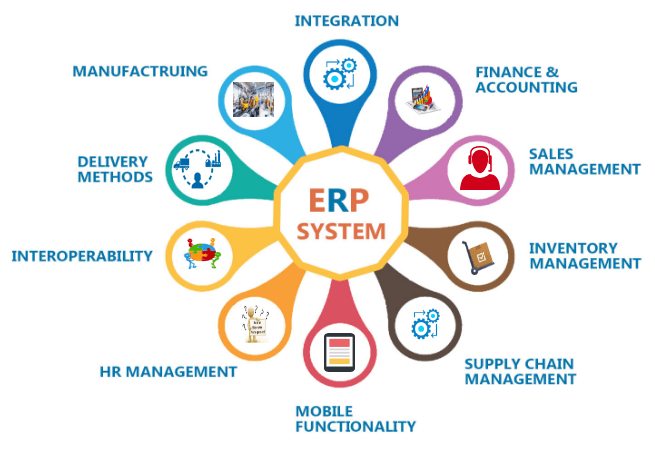
Financial capabilities may include general ledger management, accounts payable, accounts receivable, budgeting, expense tracking, invoicing, taxation, cash flow monitoring, and financial reporting. See our guide to the key features of accounting software for a closer look at how these capabilities should work together.
Transactions created in other modules should be reflected accurately within financial records. This reduces repeated data entry and helps maintain consistent reporting across the organization.
Inventory and Supply Chain Management
Inventory features may include stock tracking, receiving, transfers, adjustments, replenishment rules, supplier management, procurement, warehouse locations, and order allocation.
Businesses with multiple warehouses or sales channels may also need real-time stock visibility, lot or serial tracking, reorder alerts, and integration with shipping or fulfillment systems.
Sales and Customer Management
Sales modules can support quotations, sales orders, pricing, contracts, customer records, returns, and payment status. CRM integration may also provide access to communication history, sales opportunities, and customer service activity.
Human Resources and Payroll
An ERP application may include employee records, attendance, leave management, payroll, recruitment, performance reviews, and access controls. These requirements vary considerably by region and organization.
Businesses should define whether HR functionality will be developed within the ERP or integrated with a specialized platform. Learn more about the role of ERP software in human resource management.
Reporting and Analytics
ERP reporting should provide users with information they can act on. Dashboards may display financial performance, inventory movement, order status, procurement activity, employee workload, or production output.
Reports should use consistent definitions and traceable data sources. A visually impressive dashboard is not particularly useful when different departments calculate the same metric in different ways.
Workflow Automation
Automation can reduce repetitive work by routing approvals, generating notifications, updating records, creating scheduled reports, or triggering actions when defined conditions are met.
Approval rules should remain visible and manageable. Automation also needs exception handling so failed tasks, incorrect data, and unusual transactions can be identified and resolved without disrupting business operations.
Integration Capabilities
Modern ERP applications need reliable methods for communicating with other systems. API management, authentication controls, integration logs, retry mechanisms, and data mapping tools should be considered part of the application architecture rather than added after development.
Role-Based Access and Audit Logs
Users should only have access to the information and actions required for their responsibilities. Audit logs should record important activities such as data changes, approvals, permission updates, financial adjustments, and system configuration changes.
Factors That Affect ERP Development Cost
The cost of developing an ERP application depends on the size and complexity of the project. Important factors include:
- The number of modules and business workflows
- The amount of customization required
- The number and complexity of integrations
- Data migration and data-cleaning requirements
- Cloud, on-premises, or hybrid infrastructure
- Security and regulatory requirements
- Mobile, handheld, or offline functionality
- Testing, training, documentation, and support
Businesses should evaluate the total cost of ownership rather than focusing only on initial development. Hosting, support, upgrades, integration maintenance, user administration, and future enhancements can influence the long-term return on investment.
Common ERP Development Mistakes
ERP projects often encounter problems when businesses begin development without clear process ownership or treat the system as a collection of unrelated features.
Common mistakes include copying outdated workflows into the new application, expanding the project scope without reviewing dependencies, underestimating data migration, delaying integration testing, providing limited user training, and relying on excessive customization where configuration would be sufficient.
Clear governance, phased delivery, realistic testing, and regular stakeholder review can reduce these risks.
Choosing an ERP Development Partner
An ERP development partner should understand business processes as well as software engineering. Technical capability alone is not enough when the system needs to coordinate finance, operations, inventory, sales, and compliance requirements.
During the selection process, review the partner’s experience with ERP architecture, open-source frameworks, integrations, data migration, application security, cloud deployment, testing, and long-term maintenance.
The development team should also explain how requirements will be documented, how scope changes will be handled, how releases will be tested, and who will own the source code, infrastructure, and technical documentation.
Conclusion
Building an ERP application requires a clear understanding of business workflows, users, data, integrations, and long-term operational goals. The project should begin with requirements analysis and process design rather than immediately selecting modules or technologies.
A phased development approach can help businesses control scope, validate workflows, and introduce improvements without disrupting every department at once. Whether the application is built from scratch, developed with an open-source framework, or configured on a proprietary platform, its value depends on how effectively it supports real business operations.
NOI Technologies provides ERP application development, framework consulting, integration, modernization, and long-term support services. Contact NOI Technologies to discuss your ERP requirements and development approach.